Load Balancers
Load Balancer
Creating a Load Balancer
To create a load balancer:
Go to the Home > Load Balancing > Load Balancers section. A list of currently defined load balancers will be displayed.
To create a new load balancer, click "+ Create" on the top toolbar.
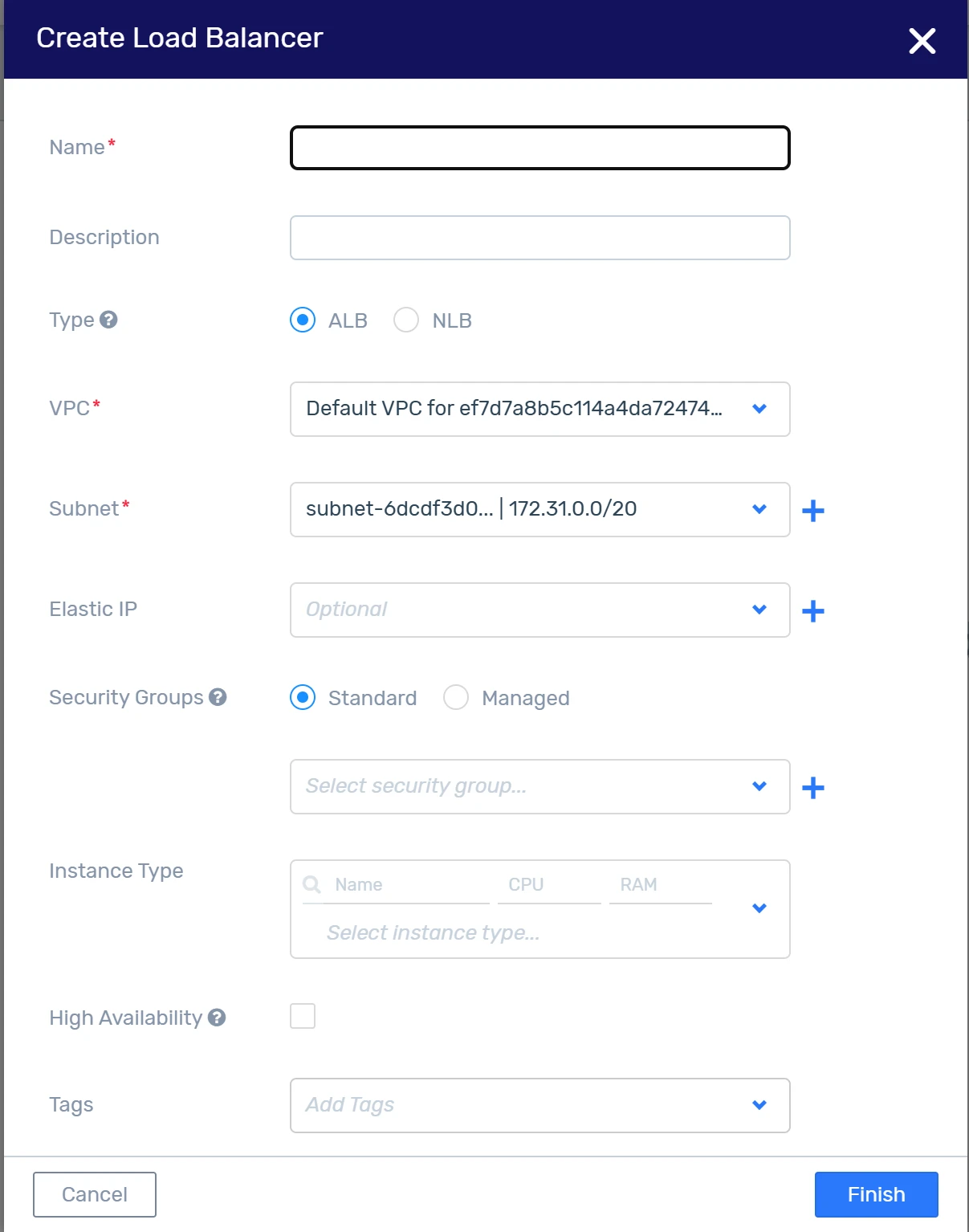
In the "Create Load Balancer" dialog box, enter the following:
Name: The name of the new load balancer.
Description: An optional description of the load balancer.
Type: The type of load balancer defines the basis on which load balancing is performed. The following types are supported:
ALB: The Application Load Balancer distributes the load among targets based on HTTP/HTTPS sessions.
NLB: The Network Load Balancer distributes the load among targets based on TCP sessions, regardless of the application layer protocol.
VPC: From the dropdown list, select the VPC to be associated with the load balancer.
Subnet: From the dropdown list, select an existing subnet to associate with the load balancer, or click "+" to define a new subnet.
Elastic IP address: From the dropdown list, select an existing Elastic IP address to be associated with the load balancer, or click "+" to define a new Elastic IP address.
Security Group: Define security groups associated with the load balancer based on the following options:
Standard: To select security groups that are created and managed by the user and can be updated at any time. The user is responsible for opening listener ports and restricting to specific sources, if necessary.
From the dropdown list, select existing security groups to be associated with the load balancer, or click "+" to define and associate a new group.
Managed: To select security groups that are created and managed by the load balancing service. Listener ports will automatically be opened for any incoming source.
Instance Type: From the dropdown list, select the instance type (vCPU, RAM, boot disk size) to be associated with the load balancer and handle the expected load.
IP Address: Optional <placeholder>
High Availability: Check or uncheck the high availability option. When selected, additional load balancers will be created for failover to automatically replace a failed load balancer.
Tags: Enter tags that can be used to simplify the identification of the load balancer and as a filter when searching.
Click “Finish.”